
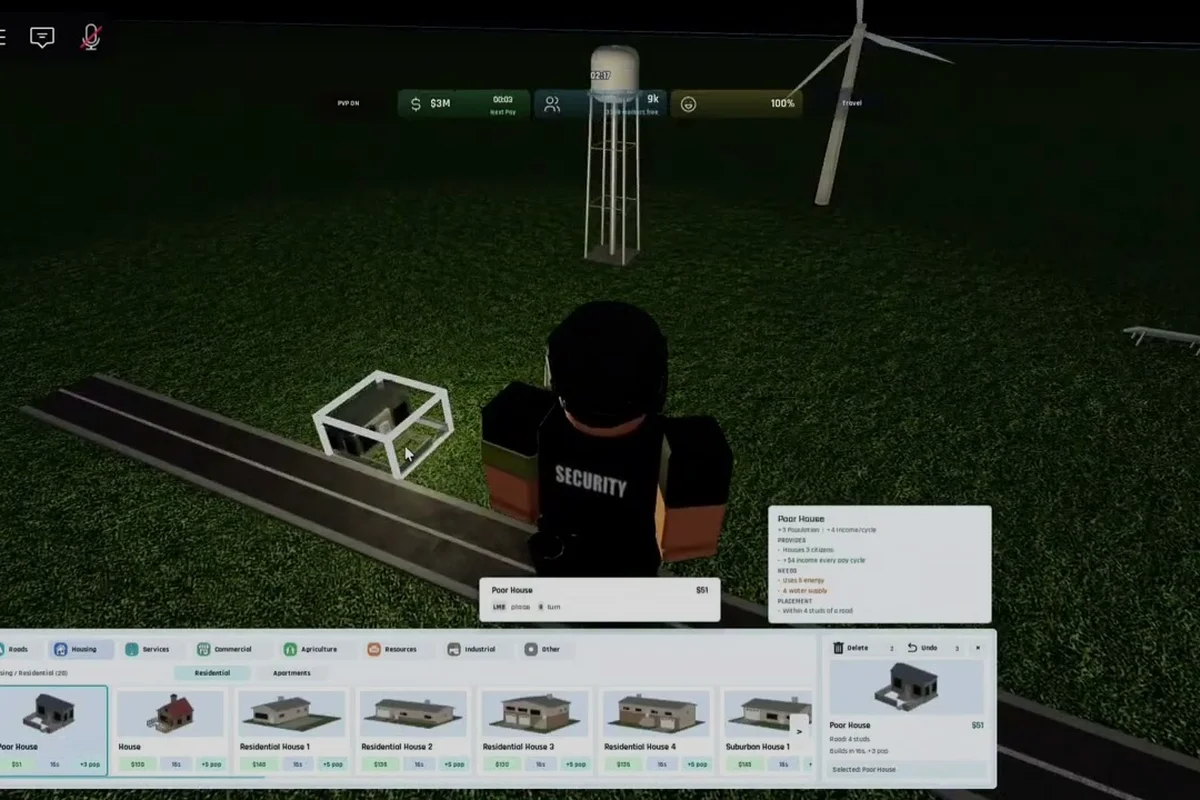
The V0.1 beta loop of Build and Conquer rewards players who nail the first city level before touching the military tree, because almost every later system — troops, missiles, multi-city expansion — is gated behind a population milestone. This starter guide distills the verified early-game steps so you can stop guessing where to place your first apartment block and start hitting 250 population, city level 2, and your first military production in a single focused session.
Understanding the Build and Conquer Early Loop
Before placing a single building, it helps to know what Build and Conquer actually asks of you during the first hour. The game layers four systems on top of each other: housing growth, utility networks (roads, water, power), economy (money from shops and services), and military production. Every beginner who stalls in V0.1 does so because one of these layers is missing — for example, apartments with no road access, or a power plant that never connects to anything.
The reason this order matters is that the population counter drives almost every unlock. Hitting 250 citizens lifts your settlement to city level 2 and opens the military tree, which is the point at which the game shifts from a city builder into the build-and-conquer loop the title promises. Skipping straight to military production without reaching that population threshold leaves you with no money to fund the units you just unlocked.
The Five-Step Verified Start Sequence
Community-tested footage from the V0.1 beta (verified 2026-10-11) lines up around a clean five-step sequence that holds across most play sessions. The table below maps each step to the system it activates and the reward you should expect.
| Step | Action | System Activated | Immediate Reward |
|---|---|---|---|
| 1 | Place mid-rise apartments in a 2×2 cluster | Housing | +40–60 population per building |
| 2 | Lay roads, water pipes, and power lines to each block | Utilities | Buildings become "functioning" status |
| 3 | Reach 250 total population | Progression | City level 2, military tree unlocked |
| 4 | Build supermarkets and a small mall | Economy | Steady money income for troop funding |
| 5 | Place a military base, queue first missiles | Military | Defensive coverage + offensive options |
Step 2 deserves special attention because it is where most first-time players lose time. A road that doesn't physically touch an apartment stays "unconnected" in Build and Conquer, even if the building is one tile away. Drag the road endpoint right onto the building's door tile, not just to an adjacent tile, to register the connection.
Housing and Population: Getting to 250 Fast
Population is the single most important number in the starter guide, and Build and Conquer gives you several housing options with very different growth profiles. Mid-rise apartments are the community-recommended first pick because they cram 40–60 residents into a small footprint, which lets you hit the 250 threshold with only four or five buildings.
Low-density houses look cheaper and more familiar, but they spread your road network thin and force you to build six or seven of them just to match one mid-rise cluster. Save low-density housing for the late game when you want to fill awkward leftover tiles.
Housing Type Comparison
| Building | Footprint | Population (V0.1 beta) | Upfront Cost | Best Used For |
|---|---|---|---|---|
| Mid-rise apartment | 2×2 | 40–60 | Medium | First 250 population rush |
| Low-density house | 1×1 | 8–12 | Low | Filling gaps, late-game density |
| Mixed-use block | 2×3 | 50–70 | High | Second city, balanced layout |
A common beginner mistake is to build one of each housing type immediately. That fragments your road and utility grids and slows growth because disconnected buildings do not add their population to the city total. Pick a single housing type for your first 250 citizens, then diversify once the military tree is open.
If you find your population growth stalling at 180–200, the cause is almost always utility coverage. Hover any building to check its status icon — buildings showing a "no water" or "no power" warning are counted at a reduced rate, or excluded entirely, depending on the patch version. The fix is mechanical: lay a continuous utility line from your power plant or water tower directly to the apartment door tile.
How Road, Pipe, and Power Grids Connect
Utilities are the connective tissue of Build and Conquer's early game, and they behave like SimCity-style network systems rather than proximity bonuses. A road tile has to physically touch the building it serves, water pipes have to form an unbroken chain from the tower to the consumer, and power lines have to reach the building without crossing an unpowered segment.
The V0.1 beta does not show utility coverage as a colored overlay by default, which is why so many new players miss it. Toggle the overlay from the map view (the small icon in the upper-right of the build panel) to see exactly which tiles are connected and which are stranded. If a building sits outside the colored zone, that is your sign to extend the network.
Utility Network Checklist
| Network | Source Building | Connection Rule | Failure Symptom |
|---|---|---|---|
| Roads | Road tiles | Must touch the building's door tile | Apartment stays "unconnected" |
| Water | Water tower | Continuous pipe chain to building | "No water" warning, low population |
| Power | Coal or fuel plant | Continuous line, no gaps | Building non-functional at night |
Players who want a deeper dive into keeping the lights on should bookmark our fuel and electricity resource breakdown, which covers generator placement and the early-game fuel ratio that keeps your power grid from collapsing once you expand.
One tip that experienced V0.1 beta players repeat: build your power plant slightly outside the apartment cluster, not in the middle of it. A central plant looks efficient, but it forces power lines to zigzag around buildings, which is both ugly and prone to accidental disconnection when you later demolish a structure for redesign. An edge placement lets you run a clean spine of power lines straight down the block.
Economy: Funding the Military Tree
Money is the bridge between city level 2 and your first missile, and Build and Conquer's economy is intentionally slow in the V0.1 beta. You will not get rich from taxes alone during the first hour, which is why commercial buildings are a non-negotiable part of the verified start sequence.
Supermarkets are the workhorse of the early economy. They cost a moderate amount, have a small footprint, and start producing income within seconds of placement. A mall is the upgrade option — bigger, more expensive, but with significantly higher income per tile. The community-recommended pattern is one supermarket per apartment cluster, then a single mall once you have three or four clusters running.
Commercial Building Tier List (V0.1 Beta)
| Tier | Building | Income Rate | Footprint | Placement Priority |
|---|---|---|---|---|
| S | Mall | High | 3×3 | After 200 population |
| A | Supermarket | Medium | 2×2 | Every apartment cluster |
| B | Convenience store | Low | 1×1 | Gap-filler only |
| C | Office tower | Variable | 2×2 | Wait for city level 3 |
Avoid the temptation to spam convenience stores. They look cheap and fit anywhere, but their income is so low that the return on investment takes longer than the time it would have taken to save up for a supermarket. Two supermarkets always beat five convenience stores.
For a broader look at how your economy feeds into the larger military game, the beginner mistakes guide walks through the most common ways new players burn their early money on buildings that do not pay back before the first attack wave.
Military and Beyond: Your First Hour After City Level 2
Once you cross 250 population and unlock city level 2, the Build and Conquer loop transforms. The military tree opens, your first missile becomes available, and the game starts sending the occasional threat toward your city. This is also where many beginners panic and overbuild defenses before their economy is ready.
The smart move is to place a military base, queue one defensive unit, and then go back to growing your economy. A single missile turret plus a small garrison is enough to handle the first attack wave in the V0.1 beta, and spending more than that before your mall is online is the fastest way to run out of money at the worst possible moment.
City Level 2 Unlock Checklist
| Unlock | What It Does | Recommended Timing |
|---|---|---|
| Military base | Queues defensive and offensive units | Immediately after level 2 |
| First missile | Long-range attack option | Queue one, do not spam |
| Second city slot | Begin multi-city expansion | After economy is stable |
| Drone command | Unlocks recon and utility drones | See dedicated drone guide |
If you want to push into multi-city play or drone unlocks right away, our drone unlock walkthrough maps the exact sequence from city level 2 to your first operational drone. For players who would rather stay defensive and learn the ropes, sticking to one city for your first full session is perfectly viable and arguably the safer learning path.
A quick word on the military base itself: it needs a road connection, just like apartments and commercial buildings. A common first-hour mistake is to place the base on a hill or in a corner "for defense," only to discover it has no road access and therefore cannot queue units. Always lay the road first, drop the base on a connected tile, and only then start queuing missiles.
Frequently Asked Questions
What is the fastest way to reach 250 population in Build and Conquer?
Build a 2×2 cluster of mid-rise apartments, connect each one with roads, water, and power before placing the next, and avoid mixing housing types during the rush. A clean four-building cluster typically hits 200–240 residents, and adding a fifth pushes you past 250 to unlock city level 2.
Do I need to build a military base immediately after city level 2?
Yes, but keep it minimal. Place one base, queue a single defensive unit, and return to economy growth. The first attack wave in the V0.1 beta is light, and overspending on defense before your mall comes online is one of the fastest ways to stall your money income.
How do I know if my power grid is actually working?
Toggle the utility overlay from the map view (upper-right of the build panel) and check that every apartment and commercial building sits inside the colored power zone. Buildings outside the zone either function at reduced capacity or not at all, depending on the patch version.
Can I skip roads and just place buildings next to each other?
No. Build and Conquer's road system requires a road tile to physically touch the building's door tile, not just an adjacent tile. A road that stops one tile short of the apartment will not register as a connection, and the building will stay flagged as "unconnected" until you extend the road.
Where does the beginner guide end and the mid-game begin?
The handoff happens once you have one stable city, a functioning economy, and at least one missile garrison online. At that point the build and conquer gameplay explained in this starter guide has done its job, and the next step is the how to win against other nations walkthrough for the contested-map phase.